

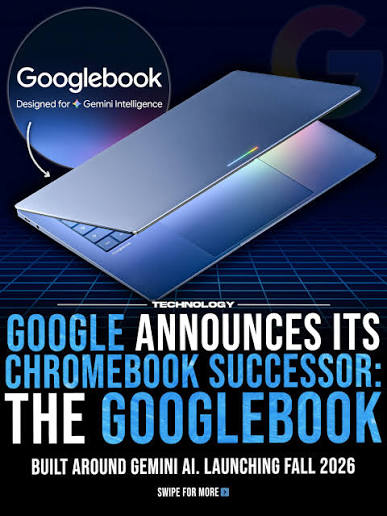
I’ve been using Chromebooks almost exclusively at home since 2011. Anyone who remembers the PC world back then knows why: the constant hassle of endless Windows updates, driver issues with external devices, and the endless chore of managing antivirus software and firewalls were exhausting. Microsoft simply missed the boat on the internet's potential back then.
Google, on the other hand, realized right away that the future belonged to the web and the cloud.
The Journey to the Cloud: From Norwich to Google Workspace
Even 15 years ago, we were already working remotely as a team. In the Microsoft ecosystem, that was pure chaos: emailing Word documents back and forth, constantly saving new versions, and ending up with complete clutter. Google’s concept of real-time shared documents was a massive breath of fresh air.
My very first Chromebook back in 2011 was a 14-inch Acer with a touchscreen. Since it wasn't even sold in Germany yet, I picked it up at an electronics store in Norwich, England, while traveling. The UK keyboard layout was actually a bonus for me, as 90% of my communication was in English at the time.
What makes ChromeOS so compelling to this day is its simplicity: it’s browser-based, built on a lightweight Linux foundation, and completely frees you from being tied to specific hardware. I can log into the Chrome browser on any machine and immediately have my entire workspace ready to go. I've been along for the ride from the early days of Gmail on Domain to Google Apps and now Google Workspace.
The Next Evolutionary Step: The "Google Book" and the AI Workflow
Now we’re approaching the next big shift: deep integration of artificial intelligence directly into the operating system.
For my current project (The Streamliner), I rely on a multi-step workflow:
When I recently chatted with Gemini about whether switching to a new "Google Book" would streamline these interfaces and simplify my workflow, things got funny: Gemini was completely bewildered.
The AI stubbornly insisted that a simple hardware upgrade to a new Chromebook wouldn't change any software processes. I actually had to copy and paste text from the official Google product page into the chat so Gemini would understand I was talking about the native OS-level integration of Gemini Intelligence. A perfect piece of modern satire: a human having to explain an AI's own product to it!
Naming Chaos: Why the Name Is So Confusing
There are two very understandable reasons why Gemini stumbled here:
Outlook: Spring 2027
Despite the comedy of errors, I’m genuinely looking forward to making the switch in Spring 2027. Once the AI layer is natively baked into the operating system and these tools connect seamlessly without manual copy-pasting, working in the cloud will hit a whole new level of efficiency.
After 15 years, one thing remains clear: the future belongs to the web—and humans are still the ultimate reality check to keep AI on its toes.
I’ve been using Chromebooks almost exclusively at home since 2011. Anyone who remembers the PC world back then knows why: the constant hassle of endless Windows updates, driver issues with external devices, and the endless chore of managing antivirus software and firewalls were exhausting. Microsoft simply missed the boat on the internet's potential back then.
Google, on the other hand, realized right away that the future belonged to the web and the cloud.
The Journey to the Cloud: From Norwich to Google Workspace
Even 15 years ago, we were already working remotely as a team. In the Microsoft ecosystem, that was pure chaos: emailing Word documents back and forth, constantly saving new versions, and ending up with complete clutter. Google’s concept of real-time shared documents was a massive breath of fresh air.
My very first Chromebook back in 2011 was a 14-inch Acer with a touchscreen. Since it wasn't even sold in Germany yet, I picked it up at an electronics store in Norwich, England, while traveling. The UK keyboard layout was actually a bonus for me, as 90% of my communication was in English at the time.
What makes ChromeOS so compelling to this day is its simplicity: it’s browser-based, built on a lightweight Linux foundation, and completely frees you from being tied to specific hardware. I can log into the Chrome browser on any machine and immediately have my entire workspace ready to go. I've been along for the ride from the early days of Gmail on Domain to Google Apps and now Google Workspace.
The Next Evolutionary Step: The "Google Book" and the AI Workflow
Now we’re approaching the next big shift: deep integration of artificial intelligence directly into the operating system.
For my current project (The Streamliner), I rely on a multi-step workflow:
When I recently chatted with Gemini about whether switching to a new "Google Book" would streamline these interfaces and simplify my workflow, things got funny: Gemini was completely bewildered.
The AI stubbornly insisted that a simple hardware upgrade to a new Chromebook wouldn't change any software processes. I actually had to copy and paste text from the official Google product page into the chat so Gemini would understand I was talking about the native OS-level integration of Gemini Intelligence. A perfect piece of modern satire: a human having to explain an AI's own product to it!
Naming Chaos: Why the Name Is So Confusing
There are two very understandable reasons why Gemini stumbled here:
Outlook: Spring 2027
Despite the comedy of errors, I’m genuinely looking forward to making the switch in Spring 2027. Once the AI layer is natively baked into the operating system and these tools connect seamlessly without manual copy-pasting, working in the cloud will hit a whole new level of efficiency.
After 15 years, one thing remains clear: the future belongs to the web—and humans are still the ultimate reality check to keep AI on its toes.

.jpeg)


